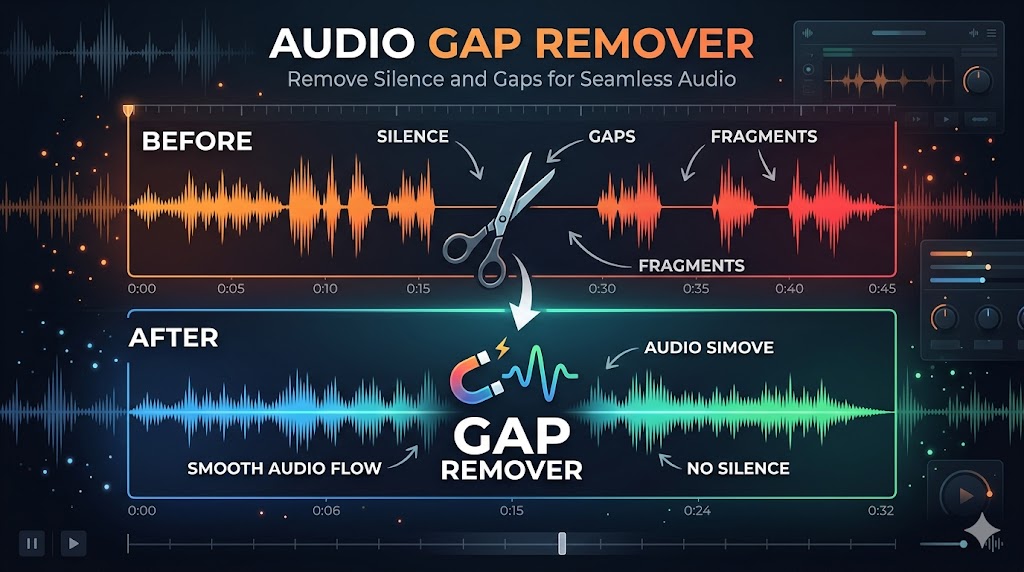
Whether you've just recorded a podcast, a voiceover, a lecture, or a music session, there's one problem almost every audio creator faces: gaps. Awkward pauses, dead air, and long silences that make recordings feel unprofessional and drag out the listening experience. An audio gap remover solves this instantly — no manual editing, no technical knowledge required.
In this guide, you'll learn exactly what audio gaps are, why they hurt your content, and how to remove them automatically using the best free tool available in 2026.
What Is an Audio Gap Remover?
An audio gap remover is a tool that automatically scans an audio file, identifies sections of silence or near-silence, and removes them — tightening the overall audio without affecting the actual spoken or musical content.
Think of it as a smart find-and-delete for silence. Instead of scrubbing through a waveform manually and cutting out empty sections one by one, the tool handles it in a single pass. The result is cleaner audio where every second counts.
What Counts as an "Audio Gap"?
Audio gaps come in many forms:
- Pre-roll silence: The quiet seconds before you start speaking after hitting record
- Post-roll silence: Dead air at the end of a recording after you finish
- Mid-sentence pauses: Long thinking pauses between words or sentences
- Between-segment gaps: Empty space when transitioning between topics
- Technical dropouts: Accidental silence caused by equipment or software issues
- Filler space: Hesitation gaps filled only by room noise or breathing
Remove Audio Gaps Instantly — Free
Upload your file. AI detects and removes every gap. Download polished audio in seconds.
Try BahaaSR Free →Why Audio Gaps Are a Bigger Problem Than You Think
They Frustrate Listeners
Listeners are impatient. When a podcast or recording contains noticeable gaps, most people don't wait them out — they skip ahead, or worse, they stop listening entirely. Studies on podcast listener behavior consistently show that silence is one of the top reasons for drop-off.
They Make Content Feel Unpolished
Even a 3-second pause feels enormous to someone listening on headphones. Gaps signal to the audience that the recording hasn't been properly edited — and that first impression sticks, regardless of how good the content is.
They Inflate File Size and Duration
Unnecessary silence adds length without adding value. A 60-minute podcast might actually contain 8–12 minutes of silence. Removing those gaps creates a tighter, denser, more engaging episode — and a smaller file to boot.
They Hurt Algorithm Performance
Spotify, Apple Podcasts, and YouTube all track listening metrics. Short average listen times, low completion rates, and frequent skip-forwards all signal poor content quality to their algorithms — reducing recommendations and search visibility. Gaps directly cause all three.
How BahaaSR Works as an Audio Gap Remover
BahaaSR is a free, browser-based audio gap remover. There's nothing to install — it works directly in your browser and processes files using AI-powered silence detection.
How It Works in 4 Steps:
- Upload your audio file — MP3, WAV, M4A, OGG, FLAC, and more are supported
- AI scans the waveform — The algorithm identifies silence and gap sections
- Gaps are removed automatically — Only silence is cut; all speech and sound is preserved
- Download your cleaned file — Same format, same quality, no gaps
The entire process typically takes 30–90 seconds for most files. No settings to adjust, no threshold to configure — BahaaSR handles everything automatically.
Audio Gap Remover: Use Cases
Podcast Editing
Long-form interviews and panel discussions are full of natural thinking pauses, overlapping silences between speakers, and gaps during topic transitions. An audio gap remover trims these down, making the episode feel tightly produced without losing conversational flow.
Voiceover & Narration
Voiceover work requires a steady, confident pace. Gaps between sentences or takes make the final narration sound hesitant. Removing them is standard practice in professional voice production — and now any creator can do it for free.
Online Courses & Lectures
Students watching recorded lectures have limited patience for silence. A course video with frequent gaps signals a lack of preparation and hurts perceived production value — even if the content itself is excellent. Cleaning gaps keeps students engaged and watching.
Audiobook Production
Audiobook listeners expect a seamless, flowing reading experience. Any prolonged pauses or hesitations break immersion. Professional audiobook producers always remove gaps as a baseline editing step.
YouTube & Social Video Audio
Even if the video visuals are continuous, audio gaps in voiceovers or commentary tracks make videos feel slow. Tighter audio pacing directly contributes to higher retention and better watch time metrics.
Music & Beat Production
Recorded instruments, vocals, or session audio often contain leading and trailing silence that interferes with mixing and timing. Removing these gaps before importing into a DAW saves editing time downstream.
Manual Gap Removal vs. Automatic Gap Removal
| Factor | Manual (Audacity etc.) | Automatic (BahaaSR) |
|---|---|---|
| Time per file | 30 min – 3 hours | 30 – 90 seconds |
| Software required | Yes — install & learn | No — runs in browser |
| Consistency | Varies by editor fatigue | Consistent every time |
| Risk of missing gaps | High — easy to overlook | None — full scan |
| Risk of cutting speech | Medium | Low — AI preserves content |
| Cost | Free (but time-costly) | Free |
| Works on all devices | No (OS-dependent) | Yes (any browser) |
The Right Amount of Silence: What to Keep vs. Remove
A common concern: "Will removing gaps make my audio sound unnatural or robotic?"
The answer depends on how the tool handles silence. BahaaSR is designed to remove unwanted gaps while preserving the natural rhythm of speech. Short pauses between sentences (under ~0.8 seconds) are typically kept — these are what make speech sound human. Longer gaps, dead air, and technical silences are what get cut.
Keep (Natural):
- Breath pauses between sentences (0.2–0.5 sec)
- Speaker handover pauses in interviews (0.3–0.8 sec)
- Deliberate dramatic pauses in storytelling
Remove (Unwanted):
- Thinking pauses longer than 1–2 seconds
- Pre-roll and post-roll silence
- Between-segment dead air
- Equipment or software dropouts
Pro Tip: Record First, Clean Later
Don't stress about pauses while recording. Just speak naturally, take your time, and let BahaaSR's audio gap remover clean everything up in post. This approach actually produces better recordings — less tension, more natural delivery.
Supported Audio Formats
BahaaSR's audio gap remover works with all major audio formats:
- MP3 — Most common podcast and music format
- WAV — Uncompressed studio quality
- M4A / AAC — Apple and mobile recordings
- OGG — Open-source streaming format
- FLAC — Lossless compressed audio
- WEBM — Web video audio tracks
Privacy & Security
Uploaded audio files are processed on secure servers and deleted automatically after processing. No account is required, and no audio data is stored, shared, or used for any purpose beyond the immediate processing task.
For sensitive recordings — interviews, confidential meetings, private voiceovers — BahaaSR's zero-retention approach means your content stays private.
Frequently Asked Questions
What exactly does an audio gap remover do?
It scans an audio file for sections of silence or near-silence and removes them, producing a tighter version of the original recording with all spoken or musical content intact.
Will it cut off the beginning or end of words?
No. BahaaSR's AI detects silence as distinct from speech — it won't cut into words or sounds. The transition points are handled cleanly so there are no abrupt cuts or clipping artifacts.
How long does processing take?
Most files process in 30–90 seconds. Larger files (anything above 100MB) may take 2–3 minutes depending on server load.
Is there a limit on file size?
BahaaSR supports files up to 500MB — enough for multi-hour recordings at high bitrates.
Does removing gaps change the audio quality?
No. The audio content itself is not re-encoded or compressed during gap removal. Quality is bit-perfect for lossless formats, and lossy formats (MP3, M4A) are handled at their original bitrate.
Can I use it for video files?
BahaaSR processes audio files. If you need to clean the audio track of a video, extract the audio first (MP3 or WAV), process it, then re-sync with your video in your editor.
Is BahaaSR really free?
Yes — BahaaSR is completely free with no hidden fees, no trial period, and no credit card required.
Conclusion
Audio gaps are one of the most common problems in recorded content, and they're also one of the easiest to fix. An audio gap remover like BahaaSR handles the entire process automatically — no editing software, no manual work, no time wasted.
Whether you're producing a podcast, recording a voiceover, building an online course, or cleaning up music recordings, removing audio gaps is the single fastest improvement you can make to your content quality.
Upload your file now and see the difference in under two minutes.
Remove Audio Gaps Now — Free
No software. No signup. Just clean, gap-free audio in seconds.
Start Free →